

Skin Maker & 3D Editor
Pixelvoid Games Ltd


About This App
Category
Adventure
Installs
1M+
Content Rating
Everyone
Screenshots


Editor Reviews
If you're a Minecraft player who loves customizing your character but finds the in-game skin editor a bit limiting, then the '3D Skins Maker for Minecraft' app is definitely worth a look. This is a dedicated mobile application for Android devices, available for free download on the Google Play Store. It's a pure mobile companion app, meaning it's designed to work on your phone or tablet to create skins that you can then import into the main Minecraft game on PC, console, or even Pocket Edition. The app has racked up millions of installs, which speaks to its popularity within the community. While you can download and install the core app for free, it does include in-app purchases, typically ranging from a couple of dollars to remove ads or unlock premium skin packs and advanced editing tools. You'll also encounter banner ads, but they're generally not too intrusive during the creative process.
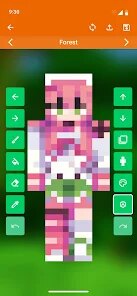
Playing with this app is all about unleashing your creativity without the technical hassle. The best part, in my opinion, is how it simplifies the complex process of skin-making. Instead of wrestling with a flat, 2D template where it's hard to visualize how your design wraps around the 3D model, this app lets you paint directly onto a rotatable 3D character. You can spin your Steve or Alex model around, zoom in on details like the face or sleeves, and see your changes in real-time. My favorite part is experimenting with layered clothing and accessories. Want to give your character a cool jacket, goggles, or a detailed backpack? The layer system makes it intuitive, feeling more like dressing a doll than editing a pixel grid. It turns skin creation from a chore into a genuinely fun and engaging activity you can do anywhere on your android device.
Compared to other skin editors out there, like the popular 'Skin Seed' or the more basic 'Minecraft Skin Studio', this app's 3D focus is its killer feature. While those other apps are great and have their own strengths, they primarily use the traditional 2D 'unwrapped' template view. For a visual learner or someone who just wants to see their creation come to life immediately, the 3D Skins Maker is far more user-friendly. I'd recommend this game—or rather, this creative tool—over others because it dramatically lowers the barrier to entry. You don't need to be a pixel-art pro to make something that looks good. If you've ever been frustrated trying to line up pixels on a flat template, just download this app from Google Play. The instant visual feedback makes the whole process feel more rewarding and accessible, especially for younger players or those new to skin customization.
Features
- True 3D Painting Canvas 🎨: You paint directly onto a live, rotatable 3D model of the Minecraft character. This is the core difference from most other skin apps and eliminates the guesswork of how your 2D design translates to the 3D game world.
- Intuitive Layer System 👕: Instead of painting on a single skin layer, you can add separate layers for clothing, armor, hair, and accessories. This makes creating complex, detailed outfits incredibly easy and non-destructive, as you can toggle layers on and off.
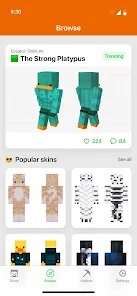
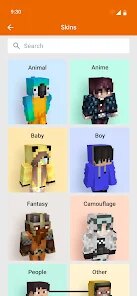
- Massive Built-in Library & Community Hub 📚: The app isn't just an editor; it's a portal. It comes packed with thousands of pre-made skins across all genres, and you can browse, download, and even remix skins shared by other users from within the app itself.
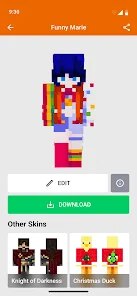
- One-Click Import to Minecraft 📤: Once your masterpiece is complete, the app generates the standard PNG file and provides clear, step-by-step instructions (or even direct integration) to get your new skin into your main Minecraft game, whether you're on Java Edition, Bedrock, or a console.
Disclaimer
1.ApexRaid does not represent any developer, nor is it the developer of any App or game.
2.ApexRaid provide custom reviews of Apps written by our own reviewers...